Friday, July 5, 2013

Creating a Photo Gallery in the Coverstar Ipad App

 
In the spring of 2012, Coverstar, a division of Latham PoolProducts, introduced their new Ipad App.  This app was designed to provide clear, concise and compelling presentations on how Coverstar cover systems enhance the safety, savings and convenience of the swimming pool.  The app is easy to navigate through whether reviewing information for Automatic or Solid & Mesh Safety Covers.   

One popular feature of the app continues to be the photo gallery.  Coverstar has provided a number of pictures to show covers installed on a number of different types of pools, and in a number of different applications.   After the app was release, several pool builders asked about the possibility of the app being updated to allow them to be able to create their own photo gallery.  Based on this suggestion, the app has since been updated so custom photo gallery’s can be created. 


Follow these steps to create your own custom photo gallery:
  1. With the photo gallery page open, press the Manage Images button on the screen.


2.  Two new buttons will be displayed.  Press the Create New Gallery Button. 

 
3.  Enter the name for the new photo gallery.  
 
 
4.  Press the Create new Logo button.  Press the Add logo button.   Thumbnails of different pictures in the camera roll on the ipad can be viewed.   


5.  Select the desired Logo. 
 
 
6.  Select the name of the newly created gallery from the images drop down menu.  
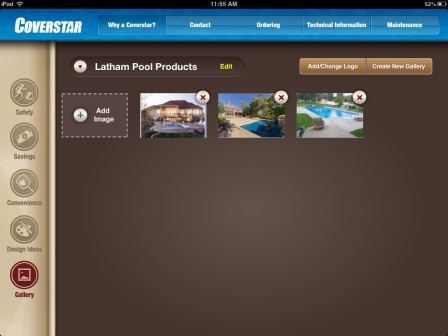
 
 
 7.  Click on th Add Image button.  Select the desired picture(s) from the camera roll on the Ipad. 

 
8.  After the images have been added to the gallery, when one of images in the gallery have been selected, the page will display the company logo and thumbnails of each picture in the gallery.  As each thumbnail is selected, the image will be shown in a larger size.   

When using the photo gallery, you can select to show the pictures in the app, the pictures from your own gallery, or you can choose to show all pictures. 


Thursday, June 27, 2013

Coverstar Safety Covers – We make it Strong, We make it Easy


Latham Pool Products offers a number of tools and features to help make the installation of a solid or mesh safety cover easier.  

 
□       CenterWeb Design

o       Allows quicker line-up

o       3x3 – 5x5 spacing for quick and easy installation         


o       Allow easy installation with less than 18” of deck space

o       Maintains safety standards with tight cover fit

o       No other manufacturer offers this feature


□       35”Installation Rod

o       Increased the length to 35" to help ergonomically

o       Diameter was decrease and wall thickness improved to better match the anchor diameter


o       Extends the life of the cover

o       A Velcro application allows the durable padding to be easily installed or removed for replacement


Friday, June 21, 2013

Slack in Automatic Safety Covers


From time to time the question arises about the need for slack in automatic pool covers and how much is enough.  All automatic pool cover fabrics are made wider than the width of the track.  There are several reasons for this:

 1.  A cover that is too tight will pull against the tracks and will not operate properly.  A cover that is made too small reduces the life of the cover and mechanism, causing premature failure of both the fabric and the mechanism due to the added stress.

2.  All fabric shrinks over a period of time.  The amount of the shrinkage varies widely according to the weather conditions, particularly the amount of time the cover is exposed to the sun.  Slack is always added to the fabric to compensate for potential fabric shrinkage.

3.  In order to meet the ASTM safety standards, the cover must lie on the water, most of the supporting strength of the cover comes from the support of the water directly under it.
 
Each cover we manufacture is made with the slack calculated on the basis of the type of fabric, application, and unit.  Any other variables that may be brought to our attention are also included.  Initially, a properly sized cover will drop almost directly down from the track or deck to the water, with some folds & wrinkles as it crosses the pool.  Because each cover is subject to many variables, it is impossible to calculate the exact amount of shrinkage each individual cover will have, so an approximation is made based on our past experience.  Our slack formula is designed to give the cover and mechanism maximum life, as well as making the cover look as attractive as possible. 


Friday, June 7, 2013

Automatic Cover Guidelines

When designing a pool that will include an automatic safety cover, it is important to consider the following guidelines:

  • Drop to water - This is the distance from the cover guide to the water level in the pool.  For the best possible results, it is important to keep the track as close to the water level as possible.  Strive to keep your cover guides within 4 inches of the water’s surface.
  •  
  • Drag (or resistance) - It takes almost no effort to push or pull a cover across water. Pulling a cover across a dry surface can create a lot of drag or resistance.  This drag commonly occurs on freeform pools where the cover guides are mounted outside the shape of the pool.       
One way to combat drag is to limit these drag areas to 10% of the total cover size. This is done by keeping the cover guides as close to edge of the pool as possible.  Another way to handle drag is by using blowers. Lifting a cover with blowers requires a significant amount of air flow (more than you might think) and must be done properly.  Blowers will create a cushion of air that the cover will ride on rather than riding on the dry surface, significantly reducing the amount of drag.   
  •  Switch location- Having the switch correctly located can prevent many problems and costly repairs. When selecting a location for the switch, keep in mind that you must be able to see the entire pool at all times.

    It is best if you can be closer to the Leading Edge Bar when the cover is in the open position so you can see that the cover is running straight.  We recommend that the switch be located along the length of the pool halfway between the middle of the pool and the mechanism end, not more than twelve feet from water’s edge. Poorly located switches are one of the largest contributors to cover failure. 
  • Drains- Lack of sufficient drainage is the most frequent cause of cover failure. When a cover housing is flooded, it is not just the motor that might be damaged.  The roll-up tube often fills with water, which can weigh several hundred pounds causing the tube to fail and the cover to rip.  The best way to protect your automatic cover is to have proper drainage. We recommend at least one three inch (3”) drain.  Increasing the size of your drain to four inches (4”) can offer additional protection.  Additional drains can be added to further prevent the possibility of flooding. Drain pipe smaller than three inches is not recommended.
By following the above guidelines, we are confident that your automatic safety cover project will be a pleasant and trouble free experience. 


Friday, May 24, 2013

Coverstar Automatic Safety Covers & Pool Studio


A few years ago, Coverstar partnered with Structure Studios, the company that introduced a 3D swimming pool design software called Pool Studio.  This software allows dealers to quickly create pool designs, complete with landscaping, running water and sound effects.  In addition to being able to create and show customers what their potential pool can look like in 3D, they can also show their pool with a Coverstar Automatic Safety Cover. 

When creating the design of the pool, Coverstar track, lids and cover fabric can be selected from the Coverstar Library and added to the design of the pool.  For those who may be unfamiliar with this process, please click on the following link to view a video that shows how to access the Coverstar library and how to add the Coverstar components. 

http://www.youtube.com/watch?v=GEuns3XAh04

 
We hope you will find this helpful as you include Coverstar Automatic Safety Covers in the design of your pools. 

Friday, May 10, 2013

Coverstar Touch Pad with WiFi


A Coverstar automatic safety cover is the best way to protect your family, your pool and your time. A backyard swimming pool is the ultimate source of family fun! But when it comes to children and pets, it is also the source of safety concerns. No parent can be watching over the pool every minute. No fence or alarm can prevent a child from getting access to an unsupervised pool. A Coverstar automatic safety cover can!

 Simply flip a switch, and your Coverstar automatic safety cover will create a barrier over your pool that no child or pet can penetrate. Coverstar is the best protection available for your family and your pool investment.

 Coverstar is proud to introduce a new touch pad control switch, which has been given a voice of its own. 

What if your pool cover controller could contact you, when you are away from home, to let you know who is using the pool?
 
Or notify you when your pool cover is closed, letting you know your pool is safe and secure?
 
What if your pool cover controller could alert you when your pool has been left uncovered?

Now it can with Coverstar!

 The new Coverstar touchpad connects to your existing home network.  It is easy to set up and will allow you to choose which notifications you want to receive such as:

  • When the cover is closed
  • When a user code is entered
  • When an unauthorized user attempts to log in
  • When the cover is left open and more
The Coverstar touchpad allows you to program up to 4 unique user codes, so different members of the family can have their own code.  The touchpad can be installed on any new or existing Coverstar automatic cover system.  Let your pool cover connect to you. 

The new touch pad control switch by Coverstar, a brand of Latham Pool Products, Behind Every Pool. 


Thursday, April 25, 2013

Featured Product - Coverstar Reusable Lid Forming Kits

Coverstar is excited to feature their reusable lid forming kits. These kits will allow concrete lid sections to be formed and poured on the job site quickly and easily, and best of all, these kits are completely reusable. The lid forming kits are available with either an inclined or a cantilever shaped profile and match the profile of Coverstar's reusable coping forms.


The new lid forming kits include:

  • Molded plastic lid forming trays
  • Removable profile forms in either a Inclined or Cantilever shape
  • Shape specific trowel
  • Easier cleaning and maintenance
  • Reduce complexity and time required to pour lids
  • Weight saver design for 20% lighter lid sections
  • Channel for locking stone to bracket
  • Easy forming of motor and non-motor ends
  • Non-weight saver tray and adjustable divider that can be used to make lid sections with custom widths.


A concrete lid is a great looking lid that helps the location of the cover housing blend in with rest of the pool. The concrete sections of lid are removable, so the cover housing can be accessed as needed.
Coverstar also has a number of aluminum and stainless steel bracket options available that can be mounted across the back of the cover box to support the concrete lid. 

These lid forming kits can be ordered either as lid forming kit or as box perimeter and lid forming kit.  The part numbers for the different kits are:
A2276     Cantilever Lid Forming Kit
A1120     Box Perimeter and Lid Forming Kit Cantilever
A2275     Inclined Lid Forming Kit
A1119     Box Perimeter and Lid Forming Kit Inclined

For more information on these reusable lid forming kits, please contact a Coverstar Representative.